

Are we still sharing passwords in 2026?
Honestly, no judgment here. I get it. No matter how many times we hear the advice, “never share your password with anyone” the temptation persists simply because it feels more efficient. It’s easier.
When the doors are about to open for your event and your volunteers are lining up to scan tickets, it feels like the fast way to do things. When you’re in a rush, using your login on every device seems like the best solution to keep things moving.
But in reality, operating your entire event under a single login is like giving everyone in your building a master key to the vault.
At Passage, we built Employee Accounts capabilities right into your dashboard to help you move past the one-account-fits-all hurdle. Here is why making the switch to individual accounts is the single easiest way to professionalize your event operations.

1. Account Security: Not Everyone Needs the Master Key
When everyone logs in as an admin, they have access to everything. That includes your total revenue, bank account details, and the ability to delete entire events or ticket types.
Most of your staff (especially seasonal volunteers!) don’t need that level of access. They just need to scan a ticket or sell a t-shirt.
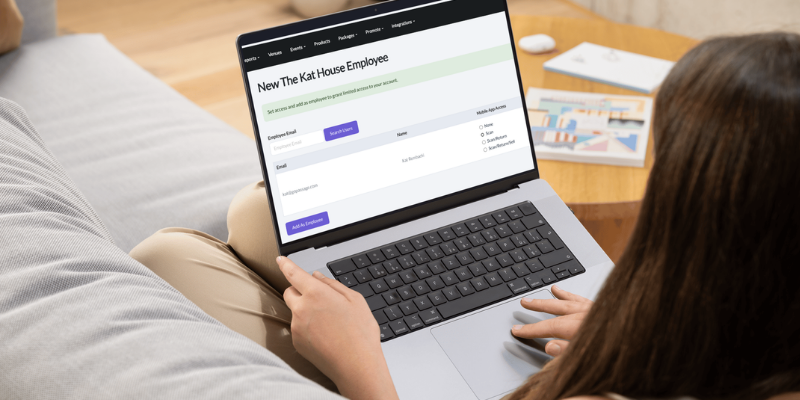
With Passage Employee Accounts, you can set role-based permissions:
Mobile App Access
⛔ None: Employee cannot use the Passage Manager app for your venue's events
-
-
Works best for: Team members who have some type of web access, but who do not need mobile access at all
-
Example: Bookkeepers and accountants
-
📱Scan: Employee may scan tickets into the event to redeem, but may NOT unredeem a customer's tickets or sell tickets in-person
- Works best for: Team members who are admitting guests at your front gate or entrance
- Example: Front-line staff, ticket scanners, volunteers
🎟️ Scan/Return: Employee may scan tickets in or out of the event to redeem or unredeem, but may NOT sell tickets in-person
-
Works best for: Team members who have authority to make basic customer service and guest recovery decisions
-
Example: Managers, supervisors, and volunteer coordinators
🎁 Scan/Return/Sell: Employee may scan tickets in or out of the event to redeem or unredeem, as well as sell tickets at your event in-person
-
Works best for: Team members involved in selling tickets, merchandise, or concessions on site at your event
-
Example: Box office staff, gift shop cashiers, concessions team
Web Admin Access
⛔ None: Employee cannot access your admin account or event info on the website
-
Works best for: Team members who are using the mobile app only, for ticket scanning or selling
-
Example: Ticket scanners and box office staff
🔏 Event Creator: Employee may create new events and edit event info including ticket types, event times, and description. However, they may not view reporting for event ticket sales
-
Works best for: Team members who
-
Example: Box office managers, ticket sales managers, event promoters
📊 Reporting: Employee may view reporting for all event ticket sales, however, they may not create new events or edit existing events
-
Works best for: Team members or vendors who need access to data but are not involved in event operations
-
Example: Bookkeepers and accountants
💼 Both: Employee may create new events and edit event info, and view reporting for all event ticket sales
-
Works best for: Team members who need full access to everything in your account
-
Example: Event organizers, venue owners
By limiting access, you aren't just protecting your data; you're protecting your staff from making accidental changes that could disrupt your entire gate.
2. Clean Reporting: No More Mystery Transactions
If you’re looking at a sales report at the end of the night and see a discrepancy in a cash drawer, how do you find out what happened? If everyone is logged into one account, every transaction looks the same.
Individual logins create a digital paper trail. When your team uses their own accounts, your Passage reports will show you exactly who processed which transaction. This is a game-changer for:
-
Reconciling Cash Drawers: Easily see which staff member was responsible for which till.
-
Problem Solving: If a customer has a ticket issue, you can see exactly who scanned them in and when.
-
Staff Incentives: Want to reward the person who sold the most concessions? Now you have the data to back it up.

3. Scale Without the Stress
As your event grows from one venue to four, or from two scanners to twenty, managing a single login becomes a logistical nightmare. Sessions time out, security alerts get triggered, and you spend more time managing logins than managing your event.
Individual employee accounts allow your team to be autonomous. They log in, they do their jobs, and you stay in control of the big picture from your own dashboard.
💡 Pro Tip: Setting Up is Faster Than You Think
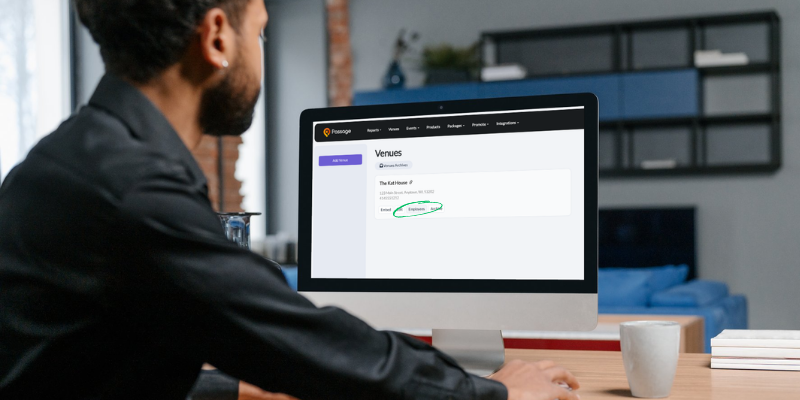
You might think adding employees will take hours of data entry. It won’t. On Passage, you simply invite an employee via email, select their permission level, and they’re ready to go.
Check out our 1-minute guide on how to assign venue employees here.
Final Thoughts
Sharing a password might feel like a shortcut, but it’s actually a bottleneck. By utilizing Employee Accounts, you’re building a more secure, transparent, and professional event.
Stop being the password-typer-in-chief and start empowering your team. Your peace of mind (and your bank account) will thank you.
Ready to level up your gate management? Log in to your Passage dashboard today to invite your first employee, or reach out to our support team if you have questions about setting up your team for success!





/Two%20young%20girls%20smiling%20into%20camera%20holding%20a%20foam%20finger%20at%20a%20sporting%20event.png)